The Shopify API has no support for discount code creation or mass discount code uploads by other means. Still, I needed a way to create 1 discount code for every order that comes in.
I was surprised to solve this rather painlessly in a short time since I’ve never used anything with urllib2 or parsing. I will document the final result instead of my trials and errors.
I like that this solution uses only basic functions. You don’t learn if it’s magic. I saw an example using mechanize that was only 20 odd lines of codes, but I don’t follow it / it’s not in python.
Next time I need to do this, I will look into python mechanize.
Here are the main steps involved in sending web requests to Shopify:
Authentication
First, we need to log in to Shopify programmatically — not through their API.
Use the urllib2 library to do so.
First, set up urllib2 to use the “opener” urllib2.HTTPCookieProcessor, which will handle cookie handling for your session.
import urllib, urllib2

opener = urllib2.build_opener( urllib2.HTTPCookieProcessor() )
urllib2.install_opener( opener )

# future requests will use the cookie processor that we install here
The next step is to log in to Shopify by setting up our urlencoded post parameters for this specific login form. All i needed to do was check out the login form and find the field names they are expecting: login, and password.
Let’s give it a shot:
params = { 'login': 'myusername', 'password': 'mypassword' }
encoded_params = urllib.urlencode( params )

_file = opener.open( 'https://myshop.myshopify.com/admin/auth/login', encoded_params )
response = _file.read()
_file.close()

# success!
Now, due to the Cookie handler, we can simply open new admin url pages and they will load without fuss.
_file = o.open('http://myshop.myshopify.com/admin/marketing')
_file.read()
_file.close()

#Works!
next step…
Posting to the discount code form…
First, navigate to the discount code page to see how their magic is happening. myshop.myshopify.com/admin/marketing is where you need to be.
I use google chrome, so you can open the developer tools, go to the resources tab, and click on the XHR subtab to see what AJAX requests are being performed when you create a discount code.
Here, I found all the information I needed to POST to replicate this behavior.
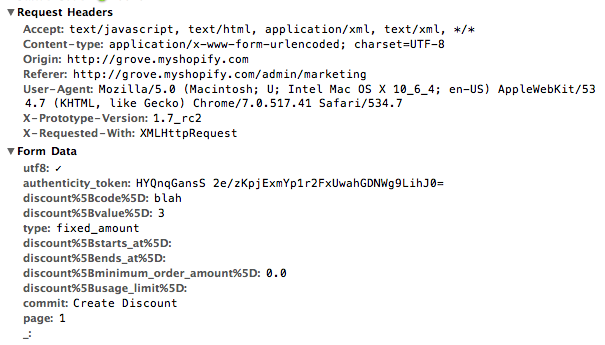
What exact headers if any that Shopify needs to see, what exact post parameters if any that shopify needs.
The important piece I see here is that there is an authentication token as a security measure Shopify takes.
We’ll need to hunt down this token and store it before we move on to making our POST.
Hunting down the authentication token
First, we need to load the /admin/marketing page to find this token. I used beautiful soup to parse the html and find the token.
        _file = opener.open( 'http://myshop.myshopify.com/admin/marketing' )
        html = _file.read()
        _file.close()

        soup = BeautifulSoup(html)
        auth_token = soup.find('input', type='hidden', attrs={'name': 'authenticity_token'})
        authentication_token = auth_token['value']
        # yay! our auth token found.
Setting up the request headers so Shopify doesn’t complain
With the auth token found, we need to modify our post headers or else Shopify will give you a 406 error. I didn’t bother to check which exact headers they check for, so I copied all of the headers I found in the screenshot above:
        post_headers = {
            'Accept': 'text/javascript, text/html, application/xml, text/xml, */*',
            'Content-type': 'application/x-www-form-urlencoded; charset=UTF-8',
            'User-Agent': 'Mozilla/5.0 (Macintosh; U; Intel Mac OS X 10_6_4; en-US) AppleWebKit/534.7 (KHTML, like Gecko) Chrome/7.0.517.41 Safari/534.7',
            'X-Prototype-Version': '1.7_rc2',
            'X-Requested-With': 'XMLHttpRequest',
        }

        # note, addheaders takes a list of tuples
        headers = [(x, y) for x, y in post_headers.iteritems()]
        opener.addheaders = headers
Setting up our actual POST
Our headers are ready, we have our authentication token, now lets set up our post data.
As in the screenshot, we know what fields Shopify is expecting. I just copied them all.
        form_data = {
            'utf8': '✓',
            'authenticity_token': authentication_token,
            'discount': 'helloDiscountCodeFromPython',
            'discount[value]': '10',
            'type':'fixed_amount',
            'discount[starts_at]': '',
            'discount[ends_at]': '',
            'discount[minimum_order_amount]': '0.00',
            'discount[usage_limit]': '1',
            'commit': 'Create Discount',
            'page': '1',
            '_': '',
        }
Let's make a discount code!
Finally, we're ready.
Here's the completed list of what we need:
- Authentication. We're logged in.
- The Authentication token.
- The POST headers for AJAX / whatever Shopify is expecting
- The POST itself
So let's give this a shot!
encoded_post_data = urllib.urlencode( form_data )
_file = opener.open( 'https://myshop.myshopify.com/admin/discounts', encoded_post_data)
response = _file.read()
_file.close()

# it works!
Fantastic! It works! I've taken this and built a class that will take options for the various discount code fields and check whether the response was successful or not (very crudely), etc.
Here's the whole process
I'll copy and paste the pieces here into one block
import urllib, urllib2

opener = urllib2.build_opener( urllib2.HTTPCookieProcessor() )
urllib2.install_opener( opener )
# future requests will use the cookie processor that we install here

# log in

params = { 'login': 'myusername', 'password': 'mypassword' }
encoded_params = urllib.urlencode( params )

_file = opener.open( 'https://myshop.myshopify.com/admin/auth/login', encoded_params )
response = _file.read()
_file.close()

# success!

# parse for auth token

_file = opener.open( 'http://myshop.myshopify.com/admin/marketing' )
html = _file.read()
_file.close()

soup = BeautifulSoup(html)
auth_token = soup.find('input', type='hidden', attrs={'name': 'authenticity_token'})
authentication_token = auth_token['value']

# auth token found.

# set up post headers

post_headers = {
    'Accept': 'text/javascript, text/html, application/xml, text/xml, */*',
    'Content-type': 'application/x-www-form-urlencoded; charset=UTF-8',
    'User-Agent': 'Mozilla/5.0 (Macintosh; U; Intel Mac OS X 10_6_4; en-US) AppleWebKit/534.7 (KHTML, like Gecko) Chrome/7.0.517.41 Safari/534.7',
    'X-Prototype-Version': '1.7_rc2',
    'X-Requested-With': 'XMLHttpRequest',
}

# note, addheaders takes a list of tuples
headers = [(x, y) for x, y in post_headers.iteritems()]
opener.addheaders = headers

# done adding headers to our opener (which means it will be used every time from now on)

# set up our post

form_data = {
    'utf8': '✓',
    'authenticity_token': authentication_token,
    'discount': 'helloDiscountCodeFromPython',
    'discount[value]': '10',
    'type':'fixed_amount',
    'discount[starts_at]': '',
    'discount[ends_at]': '',
    'discount[minimum_order_amount]': '0.00',
    'discount[usage_limit]': '1',
    'commit': 'Create Discount',
    'page': '1',
    '_': '',
}

encoded_post_data = urllib.urlencode( form_data )
_file = opener.open( 'https://myshop.myshopify.com/admin/discounts', encoded_post_data)
response = _file.read()
_file.close()

# discount code created!
 Yuji Tomita
Wow! This is bad ass! Thanks for sharing your solution with the community.
Booya! I hope it helps somebody else using Python : )
I just wanted to say thanks, Yuji.
Your code made my job much easier today.
Hey Erik,
Thanks for leaving a comment! It’s nice to know the code is helping.
PS Penny Arcade! Time to go on a reading binge / wish I played more games these days.