Django/MySQL: Operand should contain 1 column(s)

Update 12/31/2009:

Straight to the point: This MySQL error in combination with Django might be because django’s ORM is expecting one value when it receives two (example: Model.objects.filter(slug=(‘value1′,’value2’))) or anything that causes 2 values to be returned and passed into the ORM.

Look for places directly affecting the ORM (anything that converts your python code to SQL.. so anything that does a Query).

This is an error I recently got in Django and I couldn’t figure out why.

It is errors like this that don’t give an explanation for WHERE it’s being called that get me on a wild goose chase.

This is a MySQL error meaning you need to use AND. But since Django’s ORM takes care of the SQL for us, it’s hard for us casual users to know whats up.

Turns out one of my statements was passing a pair of values (value1, value2) to the object manager (filter).

So: If you have something like: some_model.objects.filter(field__lte=something), make sure that ‘something’ is a single value, not a pair.

Now it makes sense why a two value pair would throw that MySQL error, if Django treats it like a single value.

Update: Comment from Ben might help others with this problem:

For others who may hit this, I suspect your problem is that get_or_create actually returns a tuple! (the value you think it should return, boolean telling you if the value was created)

Duplicate Key IntegrityError Django

If you are wondering what part of your Django model is wrong because it is spitting out a nameless IntegrityError, it might be this:

I had a model with Unique=True & Blank=True that caused description-less IntegrityErrors because with two objects that have a field ” (blank), or Null, it was no longer unique.

I wanted the field to be Unique, IF and only if it was not blank or null.

I’ll just use Blank=True, null=True and let it be not unique if it ever does.

Website Idea

Shipping zones are a pain to figure out. I’m surprised there isn’t a shipping-zones.com kind of website plastered with ads like the “what time is it” sites.

I should make one in my free time, along with some calculators that integrate with UPS/FedEx/USPS

Why? I need to build a shipping table / zone table for Anuva anyways.

Zone
Number

State
FK Zone

ShippingTable
FK Zone
1 – $x
2 – $y
3 – $z

state = State.objects.get(code=OR)
state.zone.shippingtable_set.get(zone=state.zone).filter(qty<=4).reverse()[0]?

That sounds like a terrible way to go.

Filter the price list by qty so you only see the right prices, reverse them to make [0] the last item, and take that item?

(1 or more, 2 or more, 3 or more, 4 or more)
Filter by at <= 2
(1 or more, 2 or more)
reverse
(2 or more, 1 or more)
[0]
2 or more = price / bottle

Works.. but seems dirty.

I work much better at night.

I work much better when there are zero distractions. No people, no sounds, not anything. Right now it is 2:44AM which is getting late. I feel like I Just woke up though.

I consistently flow more at night. In fact, I’m not sure I have ever gotten into flow during the day while there is so much going on. Phone ringing, people talking, people moving, the world outside moving.

Unfortunately I need to sleep soon, even though I am only starting to get most productive.

Tomorrow there are two of our new guys coming in which is a great (quantitative) distraction. It doesn’t help we have a tasting tomorrow as well. I certainly hope I can meet my deadline for next friday.

Pseudo functioning replacement up & looking all nice.

I doubt I can get all of the shipping calculations working by then so perhaps we will start the marketing with only the club, as previously planned.

How to use pyExcelerator

I found this blog after hours of searching, and I keep referring back to it. I forgot what it was and started searching for it again and had to use terms like pyExcelerator + blog to find the guide.

Anyways, this is a great help for the not so documented pyExcelerator.

http://ntalikeris.blogspot.com/2007/10/create-excel-file-with-python-my-sort.html


Note that what comes after here is mainly for me to read back on in the future. I don’t think it makes a whole lotta sense.

I just created something to handle our orders. Currently we have to manually take orders and type out an excel file to do that.

Its the classic programming idea: Spend an hours to finish something in 5 minutes, instead of spending an hour to do it by hand.

Our platform gives us orders in CSV format. Our logistics people take it in a different format. I don’t want to do each by hand.

I wrote something to take the CSV with data, and then a CSV that has a template.

I used the python csv library to split the CSV into keys (the first row) and filled a dictionary with each key having its corresponding value. I then split the template CSV’s data fields into dict keys containing a pair of numbers (row, column).
Therefore, if the original CSV had a field called “BillAddress1”, I would make a template that has the same field and the script would spit back the coordinates.

That way I can write the data from this list into the right spots in the template.

Template CSV to Keys and Coordinates:
reader = csv.reader(file(filename))
 self.d = {}
  reader_list = []
  for item in reader:
  %nbsp;reader_list.append(item)

  for item in reader_list:
    for subitem in item:
      if subitem:
        self.d[subitem] = (reader_list.index(item), item.index(subitem))
    return self.d

This spits out a dictionary of whatever items are in the CSV that correspond to their positions.
If you filled one field in the entire sheet with “Hello” in position (10, 5), it would return a dictionary with key: “Hello” and value (10, 5)

I used those values to position my data in the actual sheet.
For example, say the real CSV has 3 rows.
| Name | Sex | Age |
| Yuji | M | 21 |
| Bob | M | 50 |

My script converts the CSV into a list, so that it can be iterated over.
Simply declare a new list and loop through the object returned by csv.reader() and append each row to the blank list.

I then make a copy of the first item (the keys), and remove that from the list. List.pop(0)
Then, I convert each item in the list to dictionary keys.

So List[0][‘KEY’] = value

Now I just need to create the writing mechanism.

I convert a CSV template to decide where our data goes.

Say I have this template:
| Name | | |
| Age | | |
| | | Sex |

My script converts those into dict keys w/ location pairs. So dict[‘Name’] = 0,0

Therefore, when I write using pyExcelerator:
self.keys = the dictionary with location pairs (the template)
self.orders = list of dictionaries like so [{a:b,c:d}, {a:b, c:d}]


for order in self.orders:
 sheet = self.workbook.add_sheet("Order")
 for item in self.keys:
  a, b = self.keys[item]
  sheet.write(a, b, item)
  sheet.write(a, b+1, order[item])

Done!

To Do

Create Anuva 1.5 with pseudo functionality (this would be simple writes to the DB/File as opposed to credit card integration)

Determine basic pseudo features (they don’t need to be integrated) + model structure

Determine availability of our wines in the states (wine-searcher) for Alder

Close and create new AMEX account
Close and create new Merchant Account

Pay the CC that is being closed?

Listen for WLI invoice + determine whether to wire full amount

Forward Matt’s email address back to us

Features:
I need a wine store now, apparently. This could be problematic.
Make sure we can do a “Sale” price. Previous price being greyed/strikethrough with new price prominent.

A Pre Pay option limited to something I specify
A variable shipping interval.

Issues embedding OpenType Fonts in Flash

Fonts are a real pain to deal with in flash. To do anything useful with them you have to embed them.

For example, you can’t change a textfields alpha without embedding it, or using some hack like turning it into a bitmap and changing the alpha on that. Look at this previous post for how to embed the fonts for alpha control.

I have ttf fonts working as such:
[Embed(source = "C:/Windows/Fonts/Verdana.ttf", fontName = "verdana")]
public static var verdana:Class;
Font.registerFont(AssetManager.HelveticaULE);

but OTF won’t work in the same manner. I have tried using systemFont as well, but this is also a pain for various reasons.

I am simply trying to convert these OTF fonts to TTF, and can’t find many reliable windows programs. Widows makes everything a pain.

FontForge allows you to convert easily but naturally it is open source and Linux. I am working on installing Cygwin the project that tries to create a Unix like environment on Windows.

http://cygwin.com/

But this is another pain. These days I’ve been wondering how useful a Mac would be at this point.

Converting Hexadecimal to base 10

Hexadecimal is base 16. Represented by 0 – 9 – A – F

I am running into many walls here. I needed to create random values of the color RED.

Color is usually expressed in hexadecimal form. 0xFFFFFF is 255R 255G 255B

it works like so: (F*16^3)+(F*16^2)+(F*16^1)+(F*16^0)

The problem is that color is expressed as this single value for all three (or four) channels. Red, Green, Blue, and sometimes Alpha.

This just means you can’t multiply “the red color” by a random 0-1 value to get another shade of red. You will get all possible colors by multiplying 0xFFFFFF by 0-1, or 16776960 in decimal.

To get all shades of red, you have to do: (random 0-1)*255 << 16 to get your hex equivalent because the Red Channel is stored in the XX0000 value. 255 = FF in hex. FF0000 is 16711680. so thats full red.

0xF = 15

0xF0 = 240

240 + 15 = 255. there it is.

R << 16 | G << 8 | B = separate RGB 0-255 converted to Hex.

Full Red Channel : 255 << 16 | 0 | 0 = 16711680 aka 0xFF0000

Full Green Channel : 255 << 8 = 65280 aka 0x00FF00

Full Red + Green = 255 << 16 | 255 << 8 = 16776960 aka 0xFFFF00

Assigning dynamic/unique variable names in a for loop in AS3

Assigning dynamic variable names to objects created in a for loop in AS3.

You have to get very creative to search these questions on google because words like “for” and “loop” are so utterly common.

If you have a loop in AS3 creating multiple variables but need them to have unique names (for later modification) you need to create something like an array to store the references to the variables.

For example, anything you create in a for loop is a temporary reference. It disappears after the loop is complete, and whatever objects were created stick around in the displayObject.

In my situation I had a loop creating my navigation elements, but needed to position each X value separately.

Here is the method I used to keep the references to these variables:

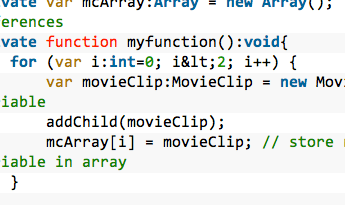
private var mcArray:Array = new Array();  // array that holds references
private function myfunction():void{
	for (var i:int=0; i&lt;2; i++) { 
		var movieClip:MovieClip = new MovieClip(); // the temporary variable
		addChild(movieClip);
		mcArray[i] = movieClip; // store reference to temporary variable in array
	}
}

Now, to use those references:

mcArray[0].method_here;
// or
// --
for (var i:int=0; i&lt;2; i++) {
	mcArray[i].foo = bar;
}

To be absolutely clear, the above example creates two MovieClips according to the loop (while i < 2), and places each MovieClip in the mcArray array at index i (which we have defined as the integer counting the loop).

Now if I wanted to access those individual MovieClips I could use the mcArray to do so.

mcArray[0].graphics.beginFill(0x555555,1);
mcArray[0].graphics.drawRect(0,0,900,300);
mcArray[0].graphics.endFill();</code>

I could also loop through the array to apply an animation to each item. The possibilities are endless when you use this basic concept!

Generate 1000 triangles. Animate each one to a random color and rotation.

I wish I could move entirely to Linux.

My laptop is a dual boot machine with Vista / Ubuntu Gutsy. My Desktop has Kubuntu Gutsy after a little accident killed windows on it (the wind knocked over one of my drives that was in a RAID).

Doing anything on the computer is more efficient and faster on Linux. I always say that a strong motivation for buying overpowered computers is it saves you a lot of frustration from hanging windows. You clicked close 30 seconds ago.. its still “thinking”. You opened a folder.. its taking ages.

Only my desktop with an overclocked E6600 Core 2 Duo + 4GB ram doesn’t reliably hiccup on Windows. Windows reliably hiccups in 99% of environments. You don’t even realize how bad it is until you try Linux.

Everything is snappy. Stuff opens the instant you click on something. It stays this way for as long as your computer is on. Imagine that? It is very difficult to quantify this snappiness. And you don’t even need a great computer. I get a huge productivity gain just by not being frustrated.

So, on that note, the second greatest thing about Linux is the productivity. I am extremely productive on this machine. Everything is a shortcut away. All of the open source programs are literally one command away from installing on any machine. I note below that text-based computing has easily documented productivity gains across the board. It’s easy to see why.

Alt+F2, Konsole, Enter
sudo apt-get install Skype

For development, my workflow is so much faster on Linux. For developing Django I am probably around 300% faster on Linux.

It helps that the same architecture is used for production servers. Linux revolves around terminals, and coding does too. Alt+F2, Konsole, Enter. Navigate to my Django directory. Type Screen. Ctrl A + C to make a new sub screen, start editing settings.py, Ctrl A +n to go to next screen, edit urls.py

Need to test the dev server? Alt+F2, Konsole, Enter, tab complete my way to my project folder, python manage.py runserver. Perhaps Super+N to turn the window negative so that the dev server stands out.
Ctrl+alt+shift+right to move the window to the right workspace, ctrl+alt+left to move back. Alt+F2, firefox, Enter. Check my dev server.

Ctrl+alt+ arrows let me switch between my 9 virtual screens. It works perfectly. I’ve tried a few windows versions and they are not worth the hassle. It doesn’t solve the problem of everything slowing down even on ONE screen, anyways.

It is entirely documented what kind of workflow gains you get from switching from GUI to Type based computing.

It also makes it infinitely more fun. Windows is a chore, Linux is something I could actually enjoy day to day. Ubuntu put fun back into computers.

There are tons of extremely useful programs only on Linux as well. Open source goes a long way into developing what people WANT/NEED/FIND USEABLE.

Every program seems to fit in the operating system.


So why can’t I completely switch to Linux?

My main reason is Adobe products. Adobe hasn’t ported their products to Linux. WHY!?
I need Photoshop and to a lesser extent Illustrator. I also use FlashDevelop which is an open source windows only Flash development tool. It felt so nicely done and felt so “Linuxy” that I assumed I could get it for linux. Nope!

Learning the Linux alternatives will take time. I’ve used GIMP and it certainly is all I need for web graphics but there is just a lot to learn.

One of the main reasons I want a mac is to have more Linux like functionality while still being able to use Adobe products.

I am a total convert to text based computing. I now realize how stupid it is to click through folders to find something. Click through folders to open an image, modify it in photoshop, click through folders to save it, etc. It’s an utter waste of time and doesn’t help by being annoying. To spend a few seconds moving your eyes across the screen looking for a particular folder is really, really, dumb. You just don’t get it untill you try something else that works infinitely better.

Linux is only getting better, and I hope Adobe starts selling Linux ports of their products. Thats the only thing I need. Otherwise I lose quite a bit from the fact that I have to shut down windows and log into Ubuntu just to use it. Therefore, if I’m designing something, and I want to use my email, I stick to windows and put up with the slowness. It wouldn’t make sense to log out every time I use something non adobe.

There is a fair learning curve, but if you don’t think of your computer as magic, you can learn it, and you will thank me.

If you do think your computer is magic, you won’t be able to understand it. The most recent releases are about as user friendly as it gets though. It most likely won’t have a problem detecting and installing the right basic sound drivers/video drivers and you can be on your way.