Ahh yes, looks much like this one here:
Happens when you return something directly instead of in an HttpResponse-type object.
Make sure your views return django httpresponse objects, not lists, strings, etc.
Yuji's Increasingly Infrequent Ramblings
Ahh yes, looks much like this one here:
Happens when you return something directly instead of in an HttpResponse-type object.
Make sure your views return django httpresponse objects, not lists, strings, etc.
I had a branch set up on Server A that I committed to the remote repository.
I had a branch set up on Server B that I committed to the remote repository.
Now, Remote Repository has branch from A and B.
Pulling branch B or branch A from either server would result in merge conflicts.
How to do I get git to pull overwriting /everything/ ? I just need exactly what is on the remote server.
Now I’m starting to sound very stupid: I just needed to do
git fetch origin branch
Apparently, git pull always merges with the current branch. Not proud to admit I’m just starting to get Git.
http://stackoverflow.com/questions/292357/whats-the-difference-between-git-pull-and-git-fetch
Set up WordPress running on Apache through an Nginx reverse proxy.
Assuming you have apache2 installed, grab the relevant PHP5 libraries:
apt-get install libapache2-mod-php5, php5
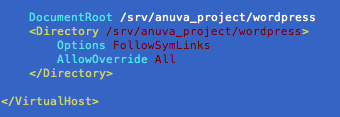
Set up an apache VirtualHost that listens on some port, say 8080.
Listen 8088
ServerName Blah
DocumentRoot /path/to/wordpress
Options FollowSymLinks
AllowOverride All
Set AllowOverride to allow wordpress to use .htaccess.
You may need to install the apache rewrite module.
locate mod_rewrite.so revealed I have mod_rewrite in /usr/lib/apache2/mod_rewrite.so, so I added a file in /etc/apache2/mods-enabledthat contained:
LoadModule rewrite_module /usr/lib/apache2/modules/mod_rewrite.so
Next up is to proxy some address to the apache server listening on 8080.
Set up a location in your nginx server configuration files to point proxy_pass the traffic to your apache server.
Inside your server directive, you’d have something like:
location /my-blog/ {
proxy_pass http://127.0.0.1:8080;
proxy_redirect off;
# more settings...
}
and bam!
visit /my-blog/ and your wordpress should start.
WordPress doesn’t know it’s living in a subdirectory because the request is proxied from Nginx.
You can fix the links from pointing at the root domain by modifying the home and home_url settings in the wp_options table to include yourdomain.com/my-blog
(also found in the general settings tab of WP admin)
It seems the admin isn’t 100% good at dealing with WP living in a subdirectory. It tends to send me off to the root domain for searches and various other misc links.
I fixed this by making a rewrite rule in nginx that directs all traffic from /wp-admin to /my-blog/wp-admin/.
location /wp-admin/ {
rewrite ^/(.*)$ http://yourdomain.com/my-blog/$1 permanent;
}
Finally, we have our blog..
My slideDown() effect was making my element appear but immediately disappeared after the animation.
I read fixes from setting hasLayout IE property by using min-heigh:0 or zoom:1, but none did the trick.
I found out I had no defined doc type.
I set it to 1.0 Transitional and everything works again…
I forget this handy method often.
$('img', this) selects img within this.
To select every nth item, use the child selector “nth-child()”
To select every 5th child, use 5n
$("#mylist li:nth-child(5n)").stuff()
Type in a whole number to get the nth item only.
I was wondering what was causing my Fancybox to display incorrectly in IE, because i kinda assumed a release would be stable across modern browsers.
The problem is just that fancybox 1.3.x has been released w/o working for IE8.
Switch back to 1.2.6 and we’re good to go.
Got this delicious error today.
AttributeError: ‘ReturnAdmin’ object has no attribute ‘__name__’
Turns out that you can’t use the ForeignKey traversing syntax used everywhere in Django for ModelAdmin list_display
list_display = ('my_fk__blah',)
Will throw this mysterious error.