Django — Runserver development server is slow on cygwin

The django development server is extremely slow through cygwin and not very reliable in the long run due to a natural limitation of Cygwin running as a windows process: the vfork resource availability errors.

My solution is to set up multiple environments – one for cygwin and a separately compiled environment for windows. That way, I get the full speed of a native windows python and the full power of the unix shell.

Modify manage.py to detect platform

We need to modify sys.path on demand depending on which platform the command is run from.

#!/usr/bin/env python
import os
import sys
import platform

DIRNAME = os.path.dirname(__file__)

# detect platform - if windows, use winenv dir for windows specific builds
if platform.system().upper() == 'WINDOWS':
    env_path = '../winenv/Lib/site-packages' # path to your win env
else:
    env_path = '../env/lib/python2.6/site-packages' # path to your usual env

full_env_path = os.path.join(DIRNAME, env_path)
sys.path.insert(0, full_env_path)

print 'Environment path is... {path}'.format(path=full_env_path)

Set up your windows environment

Naturally you will need to have a python environment working in windows first.

I use a pip requirements file to deploy my libraries, so installing the separate environment is as easy as typing ‘pip install -E winenv -r pip_requirements.txt’ on my windows command prompt.

Enjoy high performance runserver

You’re done. Open up a windows command prompt and run the development server and forget about it! Develop on cygwin while windows runs the dev server.

Endicia — Error 112 APO Address

Make sure the State code is a valid APO state address, such as AA, AE, or AP.

Having something like “Armed Forces” in the state area will cause this error.

Pulled from Wikipedia:

Three “state” codes have been assigned depending on the geographic location of the military mail recipient and also the carrier route used for sorting the mail. They are:
AE (ZIPs 09xxx) for Armed Forces Europe which includes Canada, Middle East, and Africa
AP (ZIPs 962xx – 966xx) for Armed Forces Pacific
AA (ZIPs 340xx) for Armed Forces (Central and South) Americas

Git – Revert to specific commit as a new commit

The git revert command undos one specific commit. It will add a new commit which is the opposite of the commit being undone. If you added a line, it will remove a line. If you removed a line, it will add a line.

If you need to revert to a specific commit so that the state of your repository is exactly as it was at that commit, follow this advice from StackOverflow.

http://stackoverflow.com/questions/1895059/git-revert-to-a-commit-by-sha-hash

# reset the index to the desired tree
git reset 56e05fced

# move the branch pointer back to the previous HEAD
git reset --soft HEAD@{1}

git commit -m "Revert to 56e05fced"

# Update working copy to reflect the new commit
git reset --hard

Sublime Text 2 (Beta) – Project Specific Settings

I need to make a sublime plugin that requires per project settings (API keys, passwords, etc.) which sublime doesn’t implement.

The latest update added a method to list all folders (active_window().folders()) open in a project, which means I can build a Settings class that searches all files for a specific settings file.

from ConfigParser import RawConfigParser

class ProjectSettingsMixin(object):
    """
    Create project specific settings. As of Jun 15 2011 - not supported by Sublime.

    Usage: mix this class into any sublime text base plugin class
        ex: class MyCommand(sublime_plugin.WindowCommand, ProjectSettingsMixin)

    Uses the python ConfigParser library.

    Access settings via self.settings.get('header', 'key')
    """
    SETTINGS_FILE = 'sublime.config'

    def get_project_settings_file(self):
        """
        Find project specific settings in a folder called "sublime_settings"
            - there is no support for project specific settings as of June 15, 2011.
        """
        for folder in self.window.folders():
            johnnie_walker = os.walk(os.path.abspath(folder))
            for directory, _, files in johnnie_walker:
                for file in files:
                    if file == self.SETTINGS_FILE:
                        return os.path.join(directory, file)
        raise Exception("Could not find settings file {0} in folders {1}".format(
            self.SETTINGS_FILE, self.window.folders()))

                        
    @property
    def settings(self):
        if not hasattr(self, '_settings'):
            config_parser = RawConfigParser()
            config_parser.read(self.get_project_settings_file())
            self._settings = config_parser
        return self._settings

This method ensures the expensive os.walk() is only done once.

Python – Django — UnicodeDecodeError Force Unicode to ASCII

Python ❤ and Unicode is often a problem. Many libraries don't take unicode, and if your data contains unicode, python will complain loudly.

My "quick and dirty" solution thus far has been to do ''.join([x for x in mystring if ord(x) < 128]) – turns out there's a better one!

Use the string method encode with the second argument being "replace" which will replace errors with ?.

u'Hello\u2019'.encode('ascii','replace')
# out: Hello?

Python — imaplib IMAP example with Gmail

I couldn’t find all that much information about IMAP on the web, other than the RFC3501.

The IMAP protocol document is absoutely key to understanding the commands available, but let me skip attempting to explain and just lead by example where I can point out the common gotchas I ran into.

Logging in to the inbox

import imaplib
mail = imaplib.IMAP4_SSL('imap.gmail.com')
mail.login('myusername@gmail.com', 'mypassword')
mail.list()
# Out: list of "folders" aka labels in gmail.
mail.select("inbox") # connect to inbox.

Getting all mail and fetching the latest

Let’s start by searching our inbox for all mail with the search function.
Use the built in keyword “ALL” to get all results (documented in RFC3501).

We’re going to extract the data we need from the response, then fetch the mail via the ID we just received.

result, data = mail.search(None, "ALL")

ids = data[0] # data is a list.
id_list = ids.split() # ids is a space separated string
latest_email_id = id_list[-1] # get the latest

result, data = mail.fetch(latest_email_id, "(RFC822)") # fetch the email body (RFC822) for the given ID

raw_email = data[0][1] # here's the body, which is raw text of the whole email
# including headers and alternate payloads

Using UIDs instead of volatile sequential ids

The imap search function returns a sequential id, meaning id 5 is the 5th email in your inbox.
That means if a user deletes email 10, all emails above email 10 are now pointing to the wrong email.

This is unacceptable.

Luckily we can ask the imap server to return a UID (unique id) instead.

The way this works is pretty simple: use the uid function, and pass in the string of the command in as the first argument. The rest behaves exactly the same.

result, data = mail.uid('search', None, "ALL") # search and return uids instead
latest_email_uid = data[0].split()[-1]
result, data = mail.uid('fetch', latest_email_uid, '(RFC822)')
raw_email = data[0][1]

Parsing Raw Emails

Emails pretty much look like gibberish. Luckily we have a python library for dealing with emails called… email.

It can convert raw emails into the familiar EmailMessage object.

import email
email_message = email.message_from_string(raw_email)

print email_message['To']

print email.utils.parseaddr(email_message['From']) # for parsing "Yuji Tomita" <yuji@grovemade.com>

print email_message.items() # print all headers

# note that if you want to get text content (body) and the email contains
# multiple payloads (plaintext/ html), you must parse each message separately.
# use something like the following: (taken from a stackoverflow post)
def get_first_text_block(self, email_message_instance):
    maintype = email_message_instance.get_content_maintype()
    if maintype == 'multipart':
        for part in email_message_instance.get_payload():
            if part.get_content_maintype() == 'text':
                return part.get_payload()
    elif maintype == 'text':
        return email_message_instance.get_payload()

Advanced searches

We’ve only done the basic search for “ALL”.

Let’s try something else such as a combination of searches we want and don’t want.

All available search parameters are listed in the IMAP protocol documentation and you will definitely want to check out the SEARCH Command reference.

Here are just a few searches to get you started.

Search any header

For searching any headers, such as the subject, Reply-To, Received, etc., the command is simply “(HEADER “”)”

mail.uid('search', None, '(HEADER Subject "My Search Term")')
mail.uid('search', None, '(HEADER Received "localhost")')

Search for emails since in the past day

Often times the inbox is too large and IMAP doesn’t specify a way of limiting results, resulting in extremely slow searches. One way to limit is to use the SENTSINCE keyword.

The SENTSINCE date format is DD-Jun-YYYY. In python, that would be strftime(‘%d-%b-%Y’).

import datetime
date = (datetime.date.today() - datetime.timedelta(1)).strftime("%d-%b-%Y")
result, data = mail.uid('search', None, '(SENTSINCE {date})'.format(date=date))

Limit by date, search for a subject, and exclude a sender

date = (datetime.date.today() - datetime.timedelta(1)).strftime("%d-%b-%Y")

result, data = mail.uid('search', None, '(SENTSINCE {date} HEADER Subject "My Subject" NOT FROM "yuji@grovemade.com")'.format(date=date))

Fetches

Get Gmail thread ID

Fetches can include the entire email body, or any combination of results such as email flags (seen/unseen) or gmail specific IDs such as thread ids.

result, data = mail.uid('fetch', uid, '(X-GM-THRID X-GM-MSGID)')

Get a header key only

result, data = mail.uid('fetch', uid, '(BODY[HEADER.FIELDS (DATE SUBJECT)]])')

Fetch multiple

You can fetch multiple emails at once. I found through experimentation that it’s expecting comma delimited input.

result, data = mail.uid('fetch', '1938,2398,2487', '(X-GM-THRID X-GM-MSGID)')

Use a regex to parse fetch results

The returned result isn’t very easy to swallow. They are space separated key-value pairs.

Use a simple regex to get the data you need.

import re

result, data = mail.uid('fetch', uid, '(X-GM-THRID X-GM-MSGID)')
re.search('X-GM-THRID (?P<X-GM-THRID>\d+) X-GM-MSGID (?P<X-GM-MSGID>\d+)', data[0]).groupdict()
# this becomes an organizational lifesaver once you have many results returned.

Conclusion

Well, that should leave you with a much better understanding of the IMAP protocol and using python to interface with Gmail.

Cerntainly more than I knew!
Django 1.4 Alpha – Custom List Filter : RIP FilterSpec

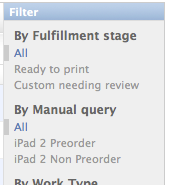
Finally, it’s here in django trunk!

Easy to use custom List Filters (previously known as FilterSpecs)!

This ticket has always around for a while awaiting documentation and tests: thank you so much to julien for making it happen.
https://code.djangoproject.com/ticket/5833

This works like a charm.

Here’s the example straight out of the brand new docs on trunk:

from django.utils.translation import ugettext_lazy as _
from django.contrib.admin import SimpleListFilter

class DecadeBornListFilter(SimpleListFilter):
   # Human-readable title which will be displayed in the
   # right admin sidebar just above the filter options.
   title = _('decade born')

   # Parameter for the filter that will be used in the URL query.
   parameter_name = 'decade'

   def lookups(self, request, model_admin):
       """
       Returns a list of tuples. The first element in each
       tuple is the coded value for the option that will
       appear in the URL query. The second element is the
       human-readable name for the option that will appear
       in the right sidebar.
       """
       return (
           ('80s', _('in the eighties')),
           ('90s', _('in the nineties')),
       )

   def queryset(self, request, queryset):
       """
       Returns the filtered queryset based on the value
       provided in the query string and retrievable via
       `self.value()`.
       """
       # Compare the requested value (either '80s' or 'other')
       # to decide how to filter the queryset.
       if self.value() == '80s':
           return queryset.filter(birthday__year__gte=1980,
                                   birthday__year__lte=1989)
       if self.value() == '90s':
           return queryset.filter(birthday__year__gte=1990,
                                  birthday__year__lte=1999)

class PersonAdmin(ModelAdmin):
   list_filter = (DecadeBornListFilter,)

Django — Catch request data read error

Every time an upload fails, I get a 500 email from django and it’s getting old.

I’ve looked into this a few times but it appears it’s a tough problem to “solve” because there is no standardized error message for WSGI connection breaks such as this.

I do know that mod_python throws a different exception message, and you definitely can’t just capture all IOErrors.

I understand this is platform dependent, but I’ve set up an exception catching middleware that checks for ‘request data read error’ in the exception message and swallows it if found.

class CatchUploadIOErrorMiddleware(object):
    def process_exception(self, request, exception):
        msg = exception.message
        if 'request data read error' in msg:
            log.warn("Catching IOError.. {msg}".format(msg=msg))
            response = http.HttpResponse('[insert useful error here]') 
            response.status_code = 500
            return response