Braintree Payment Solutions Review: It’s Amazing!

Braintree Payments is absolutely amazing.

They ❤ developers, and it's true. Not only that, they have a neat transparent redirect system that allows your clients to POST form data directly to braintree, bypassing your servers entirely. You can get PCI compliant quite easily.

Transparent redirect secures card data completely

This is a huge benefit.

Braintree has a standard Server to Server (S2S) API with client libraries in major application environments (Python, Ruby, PHP, Java, Perl, .NET, even Node!) which stand out from ease of use already, but they offer even more: the transparent redirect system.

With TR, your HTML form elements literally point to Braintree. Clients send absolutely no data to your servers, and your PCI Compliance requirements are drastically reduced. You can qualify for a self assessment questionnaire (if you don’t enter any CC data over the phone for example) rather painlessly.

How does TR work?

There are two components to TR. One is data encrypted from the server in a hidden tr_data field. The other is the user-fillable input boxes.

When you initialize the tr_data generating function, you’ll give it a callback url for braintree to redirect to. It not only serves to direct users back to your site, but the query string contains data that you can pass to your client library to get a Transaction object exactly as if you’d done the S2S implementation. Seamless!

Step 1: post the form to braintree

Fill in the tr_data, fill in the minimum required CC fields, and post away to your merchant TR URL.

If you’re worried about your users manually submitting data, you can enforce data submission by the server by using the tr_data field.

For example, you might force the billing country to be from the US.

Step 2: handle the query string at your callback url

At the callback url you supplied the client library to generate your tr_data, pass the query string into the braintree client library. It will return a Transaction object just as if you’d done it through S2S.

Here, I check to make sure it’s not an Error response (at which point I have to put in some special logic to display the error at the submitting form view) and redirect to a success view if the transaction is successful.

Step 3: do what you will with a securely created Transaction object

The amazing thing is that the result is the same object you’d deal with if you had used the S2S API.

Clear pricing

I don’t even want to look into the 40 or 60 different rates we have for our credit cards. It’s utterly complicated and confusing. Hidden fees seem everywhere.

Not so here. http://www.braintreepayments.com/pricing

What is that, 3 numbers? All of which amount to less right off the bat than what I’ve been quoted.

I think this transparency is a trend among emerging tech companies. There’s no reason why payments have to be difficult.

Clean and clear monthly reports

Finally, a company that gives us great monthly reports. The payments industry is amazingly behind the times (everything is paper based) but at the very least this is the best experience I’ve had with clearly itemized monthly reports.

Even chargebacks are on this report. With several other payment company combinations I’ve used, all we’d get is a piece of paper in the mail and no other record.

Amazing support.

Helpful people pick up the phone in 15 seconds.

I got great support the first time I called about a decently technical question.

Amazing amazing support

This support is unreal. Our shopping cart: Shopify had some interesting error messages for cards declined due to AVS. It was unhelpful and confusing customers.

When I brought the issue up with Braintree rather casually (3 sentence email?) their support staff responded telling me it wasn’t their fault – it was Shopify’s ActiveMerchant.

Guess what they did without any further contact? They decided to submit a patch to ActiveMerchant on Github to fix detection of AVS mismatches with better error messages.

Let’s see, what happened for 3 sentences?

  1. they read it.
  2. they responded / it wasn’t their fault.
  3. they looked into ActiveMerchant and found the problem with the braintree code.
  4. they actually fixed it and submitted the patch.

I think that’s pretty amazing.

Conclusion: amazing.

OSX Lion / Snow Leopard Terminal Line Wrapping Problem Solution

I’ve always dealt with line wrapping problems on OSX and my terminal. Specifically, iPython. I finally looked for a solution, and the problem was not having python readline installed.

My iPython looked like this:

After a simple google search, a user named minrk on github pointed out that iPython actually complains about “leopard libedit detected”, meaning iPython could not find the readline module.

Yes, a better message is in order….

Anyways, sudo easy_install readline and you’re done.

sudo easy_install readline

Magic.

Git aborting – could not detach head / sudden permission problems on OSX Lion

Somehow my git broke over night (computer has not even reset) causing this cryptic error.
After digging, I noticed that my project directory is now owned by root

All I got was “aborting” as a message when I tried to pull in changes from remote. It didn’t even give a hint as to what was wrong.

When I tried to check out, I got a better error message: “could not detach head”.
Google searches lead me to believe it’s a permission issue.

I look around and notice that ls -l shows my git folder owned by root.

sudo chown -R me my_project

Done!

AJAX, django signals, and class based awesomeness.

AJAX, django signals, and class based view awesomeness.

I’ve started using a combination of class based views and signals that is very powerful and extensible.

A personalized class based view base class

I’ve set up a BaseView class in my project which inherits from django.views.generic.base.View that sets sensible defaults for my AJAX classes.

For example, I have an AJAXBaseView class which defines four attributes: errors, messages, data, and success. It also has a response_data property that formats the data in a specific way for my JavaScript.

This setup ensures I use the same format for my ajax responses across my project.

    class AJAXBaseView(View):
    	def __init__(self, *args, **kwargs):
    		super(BaseView, self).__init__(*args, **kwargs)
		
    		# set sensible default class instance attributes.
    		self.errors = []
    		self.messages = []
    		self.data = {}
    		self.success = False

		
    	@property
    	def response_data(self):
    		"""
    		Format response data
    		"""
    		return {
    			'success': self.success,
    			'errors': self.errors,
    			'data': self.data,
    			'messages': self.messages,
    		}
    		
    
    class MyAJAXView(AJAXBaseView):
        def get(self, request):
            some_signal.send(sender=MyAJAXView, instance=self) 
            # modifies instance.errors/messages
            
            return http.HttpResponse(json.dumps(self.response_data))
            

It also works great with signals since I always pass the view class to the signal. The signal can directly modify the instance error/message/data attributes, and the view will automatically format the data to our ajax format.

Access to the request object in class based view initialization

I was looking for a good place for the equivalent of __init__ with access to the request object that I could override. I found it in the dispatch method.

Since I generally don’t override it, it’s a great and DRY place for some base class code.

class CartBaseView(BaseView):
	def get_cart_from_request(self, request):
        # magically get cart
        return magic_cart
        
        
	def dispatch(self, request, *args, **kwargs):
		self.cart = self.get_cart_from_request(request)
		return super(CartBaseView, self).dispatch(request, *args, **kwargs)
		
		
class ViewCartView(CartBaseView):
    def get(self, request):
        print self.cart
        # sweet!
        
        
    def post(self, request):
        print self.cart

Class based views are extremely powerful and I’m loving them.

Hackintosh – Dell XPS 8100 Realtek Sound Card Kext

Sound has been a royal pain to get working on this machine.

OSX 10.6 Snow Leopard and 10.7 lion both have problems.

This one died on me with my last software update.

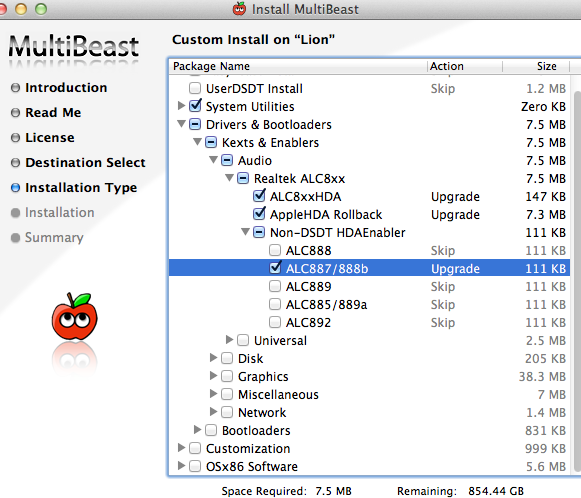
The key is to use multibeast and to make sure you enable only the exact hardware in the Non-DSDT HDA Enabler and to remove all Voodoo kexts and HDA enablers in your extensions.

My card is a 887, so I selected 887/888b

If you have ANY others selected, your sound will break and the machine will falsely identify your card as a 892 or some such.

Jquery UI Autocomplete — Focus event via keyboard clears input content

If mousing over your autocomplete results correctly updates the input box with the currently highlighted value, but doing so via keyboard doesn’t (leaves the input blank) no matter what you put in your focus function, you need to prevent the default behavior from triggering.

For whatever reason, the default behavior works for mouse hovers but not keyboard.

        $("#faq_search").autocomplete({
            source: "/faq/ajax/",
            focus: function( event, ui ) {
                event.preventDefault(); // without this: keyboard movements reset the input to ''
                $(this).val(ui.item.question);
            },
            select: function( event, ui ) {
                document.location.href = ui.item.url;
            },
            context: this
        })

OSX – Install PIL on OSX 10.7 Lion

If the jpeg encoder is not available when PIL is compiled, you should simply remove PIL, and reinstall it after making sure libjpeg successfully installs.

I use homebrew to install libjpeg.

brew install libjpeg

# linking failed for me
sudo brew link jpeg

# sudo pip uninstall PIL if you already have PIL installed.
sudo pip install PIL