Mac OSX — Terminal Page Up / Page Down Keybindings

How to setup your mac terminal page up and page down shortcuts.

Default for page up/ page down in terminal is to scroll the actual terminal, not send a page up / page down command TO the program in the terminal .

In short, open terminal settings > go to key bindings>

set page up to 33[5~
set page down to 33[6~
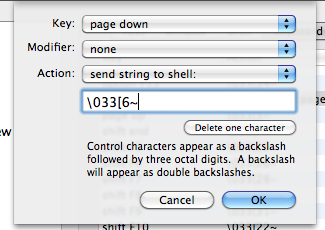
Note that 33 is the ESC key. Typing in \ on its own will result in an escape slash (or smth): \\

So in this case, type in ESC, [, 6, and ~.

Let me know if it helped!

Dell M1210 Hackintosh Intel GMA 950 (not Nvidia)

This was fairly painless procedure: 1 shot did the trick.

LOTS Of googlefu was involved.

  1. Installed ideneb 10.5.6
  2. Screen went black after restart, so followed instructions somewhere to log in to the single user mode (f8 -s on darwin startup), mount the drive mount -uw /, and delete the AppelIntelGMA* files.
  3. Reboot, and we have a crappy looking osx launched.
  4. Now, I enabled root account, and downloaded the intel GMA950 kexts from http://www.insanelymac.com/forum/index.php?showtopic=156261
  5. Reboot, and we have full res.
  6. Sound is not around, and neither is my wireless card (looks like I need to get a different one) but this accomplishes my goal of trying OSX to see if I would like it here for web development.

Django — ‘NoneType’ object has no attribute ‘has_header’

‘NoneType’ object has no attribute ‘has_header’

on if not response.has_header(‘ETag’):

This error appears if you don’t return anything from your view.

return direct_to_template(request, "template")

I wonder if this is a new error message? I recall a more specific error in my previous version of django, something along the lines of “Your view didn’t return anything!”

Django Plugins — Django South for Database Migrations

django-south

Database migrations handled easily. Now I can add the migration files that are generated to the GIT repository PER-BRANCH and grab them on the production server when the time comes.

UPDATE 9 months later when I realized this is one of the top results for django south.

I might as well write a simple tutorial on how to use it. Read the South docs, but in as few lines of code as possible, here’s what to do:

pip install South


### modify settings.py and add 'south' to INSTALLED_APPS


python manage.py syncdb 
# adds south tables


python manage.py schemamigration myapp --initial
# sets up your app for the first migration.


python manage.py migrate myapp --fake 
# "fakes" a migration because you will get an error if you try to migrate
# from an existing database setup. You will get a "table already exists" error otherwise.


### modify your app models, then auto-create a migration


python manage.py schemamigration myapp --auto
# this will auto detect the changes


python manage.py migrate myapp
# will apply new migration.


git add myapp/migrations/ 
# add migrations to version control


### download migrations on remote machine, and simply type in 
python manage.py migrate
# note: this is after faking the first migration if the database exists.

Hope that helps!

Aptana 3 — Python Support / PyDev on Aptana 3 Beta

If you’re running Aptana 3 Beta Windows, PyDev isn’t in the default list of addons via their package installer.

To install it, you just need to add the PyDev site to the installer.

  1. Go to Help > Install New Software
  2. Click “Add”
  3. Fill in PyDev for name, and http://www.pydev.org/updates/ for the location.
  4. Find PyDev by typing Py in the filter text
  5. Check PyDev and be on your way