Set up WordPress running on Apache through an Nginx reverse proxy.
Assuming you have apache2 installed, grab the relevant PHP5 libraries:
apt-get install libapache2-mod-php5, php5
Set up Apache
Set up an apache VirtualHost that listens on some port, say 8080.
Listen 8088
ServerName Blah

DocumentRoot /path/to/wordpress
Options FollowSymLinks

AllowOverride All
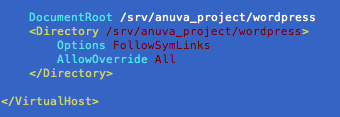
Set AllowOverride to allow wordpress to use .htaccess.
mod rewrite
You may need to install the apache rewrite module.
locate mod_rewrite.so revealed I have mod_rewrite in /usr/lib/apache2/mod_rewrite.so, so I added a file in /etc/apache2/mods-enabledthat contained:
LoadModule rewrite_module /usr/lib/apache2/modules/mod_rewrite.so
Set up Nginx
Next up is to proxy some address to the apache server listening on 8080.
Set up a location in your nginx server configuration files to point proxy_pass the traffic to your apache server.
Inside your server directive, you’d have something like:
 location /my-blog/ {

proxy_pass http://127.0.0.1:8080;

proxy_redirect off;

# more settings...

}
and bam!
visit /my-blog/ and your wordpress should start.
Modify wordpress to use new addresses
WordPress doesn’t know it’s living in a subdirectory because the request is proxied from Nginx.
You can fix the links from pointing at the root domain by modifying the home and home_url settings in the wp_options table to include yourdomain.com/my-blog
(also found in the general settings tab of WP admin)
Finally, one last fix with nginx for wp-admin bugginess
It seems the admin isn’t 100% good at dealing with WP living in a subdirectory. It tends to send me off to the root domain for searches and various other misc links.
I fixed this by making a rewrite rule in nginx that directs all traffic from /wp-admin to /my-blog/wp-admin/.
location /wp-admin/ {

rewrite ^/(.*)$ http://yourdomain.com/my-blog/$1 permanent;

}
Finally, we have our blog..

 Yuji Tomita