TextMate — CSS File Type for .css.liquid extensions

The default Liquid bundle will conflict with CSS Liquid files meaning syntax highlighting will off for CSS Liquid.

I had to switch between CSS and HTML Liquid since both files have .liquid endings.

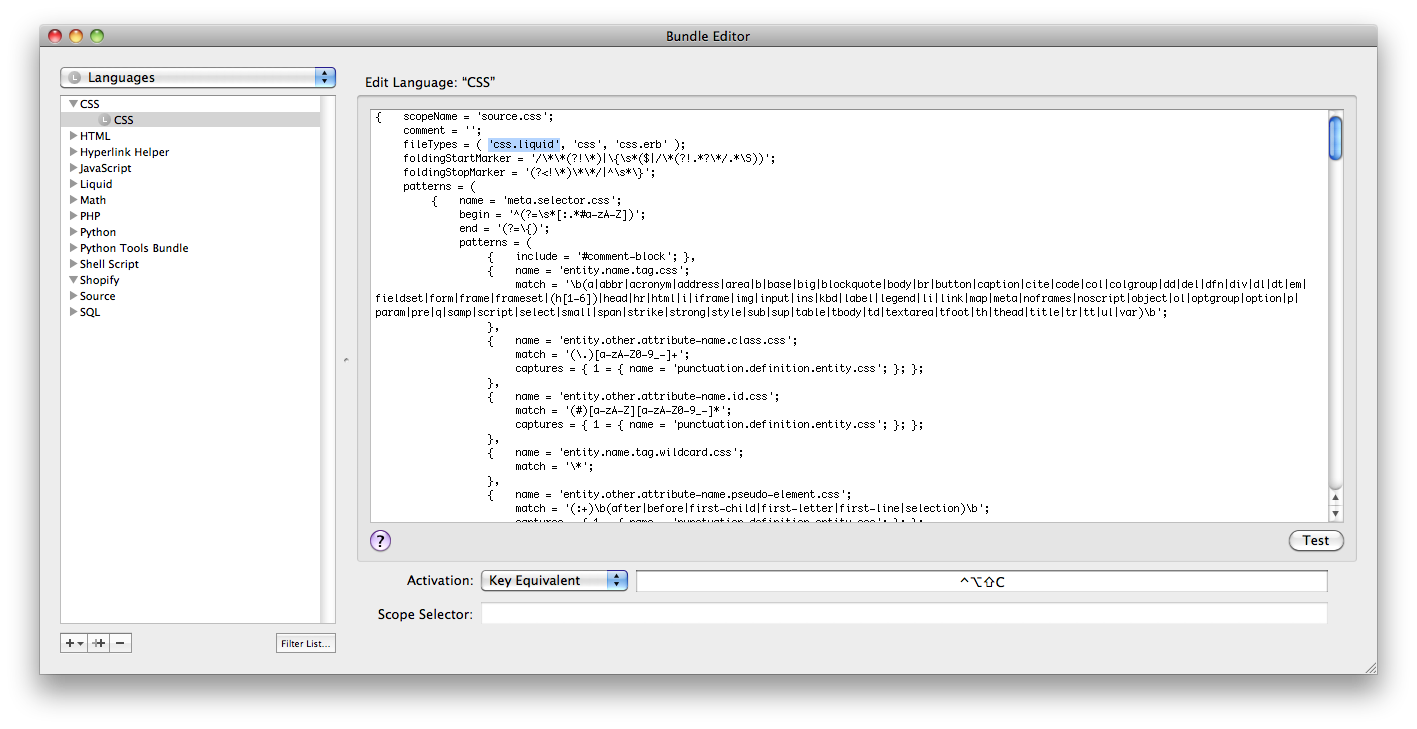
To add css.liquid to the CSS language, push cmd+option+control+L, click on CSS, click on CSS again, and add ‘css.liquid’ to the ‘fileTypes’ line.

Django — Automatically importing modules for python manage.py shell

Ever wonder how many hours of time you’ve wasted importing the same things over and over at the start of a python manage.py shell?

Imagine the number of times you forgot to import datetime or decimal, or your model even.

I’ve finally had enough and looked up ways around this problem.

Luckily, this iPython solution is amazingly easy. Cut and paste code into iPython’s config files (which are python as well) and you’re done!

http://djangosnippets.org/snippets/549/

It will take 2 minutes max.

Django / Postfix — Connection Refused on send_mail on OSX

I was having trouble sending email from my local development environment (OS X) via django’s send_mail, and thus smtplib.

I figured out I need to enable postfix for OSX following the directions here:
http://www.agileapproach.com/blog-entry/how-enable-local-smtp-postfix-os-x-leopard-0

Except I had to do as a comment mentioned in the post, write each key/value as its own line, like so:

	<key>RunAtLoad</key> 
	<true/> 
	<key>KeepAlive</key> 
	<true/>

Check if postfix is running by typing sudo postfix status

If it’s not running, just start it: sudo postfix start

Now try connecting to it via localhost port 25

s = smtplib.SMTP('localhost')
# or send_mail
django.core.mail.send_mail(...)

Django — How to Order Inline ForeignKey

To apply ordering to a foreign key in the admin, you simply define an “ordering” attribute in your ModelAdmin.

But what about Inlines?

To apply ordering to an Inline Model’s foreign key, override the default form of the admin.StackedInline or admin.TabularInline subclass by specifying a ModelForm.

class OrderedInlineForm(forms.ModelForm):
    product = forms.ModelChoiceField(queryset=Product.objects.order_by('name'))
    class Meta:
        model = MyInlineModel

class MyInlineModelAdmin(admin.StackedInline):
    model = MyInlineModel
    form = OrderedInlineForm

Git Merge — Ignore Merge Conflicts for Specific Directory

How do you have Git ignore merge conflicts for a directory?
How do you force git to always accept files from a specific branch?

Look no further.

I have all of my project files in a git repo, including my libraries. Some libraries must compile and build binaries dependent on the OS, in my example pyCrypto.

That means I have a development branch for local development on my Mac, and a production branch that has the correct pyCrypto binaries for the production server.

However, every time I try to merge changes from my development branch, I’d get conflicts (naturally) since the binaries are different between the two packages.

I’ve solved my problem by forcing git to NOT merge the Crypto folder at all

I set up a git merge driver that does nothing at all, and set all files in the Crypto folder to use this driver.

All of this info comes from a stack question here http://stackoverflow.com/questions/928646/how-do-i-tell-git-to-always-select-my-local-version-for-conflicted-merges-on-a-sp/930495#930495

Step 1: create a special merge rule in your repositories .git/config file

[merge "keepmine"]
        name = dont_merge_selected_files
        driver = echo %O %A %B

Step 2: navigate to the folder you want never merged from outside branches, and create a .gitattributes file where you specify all files to use the merge driver “keepmine” defined in step 1

* merge=keepmine

commit your changes, and try merging! The conflicts in the folder with .gitattributes will not register and leave the original files intact. If you want the other way around, where your branch is always overwritten by a merge, take a look at the stack post above.

It says to set up a merge driver as

keepMine.sh %O %A %B

and in your keepMine.sh

cp -f $3 $2.
return 0

where 0 is the exit code of “resolved”.

This saves my world.

GitHub — fatal: ‘/data/repositories…’ does not appear to be a git repository

I just found out that my specific problem with GitHub doesn’t have to do with MY settings at all — I need to ask GitHub to fix an error in their systems.

http://support.github.com/discussions/repos/3426-fatal-datarepositories-does-not-appear-to-be-a-git-repository

Hopefully this helps somebody else getting the same problem.

Make sure you can ssh git@github.com

ssh git@github.com
ERROR: Hi yuchant! You've successfully authenticated, but GitHub does not provide shell access
Connection to github.com closed.

If you are having issues with permissions, read the answer to this stack question: http://stackoverflow.com/questions/922210/unable-to-git-push-master-to-github for tons of debugging ideas.

For me, it turns out it wasn’t my fault : )

Mac OSX — Installing a fresh Django environment with Homebrew, Git, and Virutualenv

How to install an isolated Django environment with Homebrew, Git, Virtualenv on OSX 10.6.5

I needed to start a local development environment, and every time I make a major switch whether it be a new server or a new OS, I try to make improvements based on what I’ve learned since the previous switch.

This time, I decided I need completely isolated virtualenvs, and I needed my code rewritten to use relative paths so that I can actually run my django app in my local environment without any changes.

Anyways…

First, install homebrew

I need the package manager Homebrew to do easy installs of various things like wget, Git, that are missing.

ruby -e "$(curl -fsSL https://gist.github.com/raw/323731/install_homebrew.rb)"

Next, install Xcode

You can find Xcode on the CD that ships with your mac.

Just open the CD, go to the Optional Installs folder, and click on the Xcode package.

This post has more detail if you require it http://www.mactricksandtips.com/2010/02/installing-xcode.html

Homebrew some Git

brew install git

Bam.

Use easy_install to grab virtualenv

easy_install virtualenv

Finally, time to set up our project!

First, we need to set up our project folder. I shall call it myproject. Very original.

mkdir myproject 
cd myproject

Now, it’s time to set up the virtual environment. I’m going ot use the –no-site-packages option to completely isolate this environment from the global python site-packages living in /Library/Python/X.X/site-packages

virtualenv venv --no-site-packages  # isolate from packages
cd venv  # cd into our newly created venv

virtualenv has set us up (the bomb) with a lib/ directory where python2.6 lives, and a bin/ directory where we have the activation scripts that force us to use this environment.

Since we want to install django into this virtualenv, run the bash script “bin/activate”

source bin/activate

Now we can install django. It’s now as easy as typing …

easy_install django

We can install most packages this way..

PS: I’d like to note that I had trouble installing PIL due to a bug. As of Nov 20, 2010, easy_install PIL will install to the correct directory but will not work. All you need to do is symlink the funky egg file to the same directory under the name PIL.

easy_install PIL
ln -s PIL............ PIL

Now we’re ready to start the django project.

cd ~/myproject
source venv/bin/activate # MAKE SURE you have activated your virtualenv, or else your python can't find the django you just installed.
django-admin.py startproject main

Congrats! Your isolated django install is ready on OSX
Bash / bash-alias / SSH — Automatically screen -x after logging in

I found myself setting up bash aliases that auto log me into my servers without having to type in a port number or password, but always found myself typing screen -x after I log in. I wanted a way to automatically queue a command after the SSH was established.

Sometimes, in spotty areas of connections, I have to do it *a lot*.

Passing in screen -x after the ssh returns an error that a terminal must be connected…

The solution is to use the -t flag

-t Force pseudo-tty allocation. This can be used to execute arbi-
trary screen-based programs on a remote machine, which can be
very useful, e.g., when implementing menu services. Multiple -t
options force tty allocation, even if ssh has no local tty.

ssh me@me.com -p 3298 -t "screen -x"