Data Modeling — Free OSX Entity Relationship Diagram Software

I searched for mac ERD software for a while, and couldn’t find anything but crap, crap ports, over-built (for my needs), or $100-$500 a license software.

Of course there was a ton of windows apps, but not for OSX.

I had to turn to stackoverflow for help on this one and thanks to sfinnie from Scotland found an obscure, fantastic piece of software called yEd Graph Editor.

http://www.yworks.com/en/products_yed_about.html

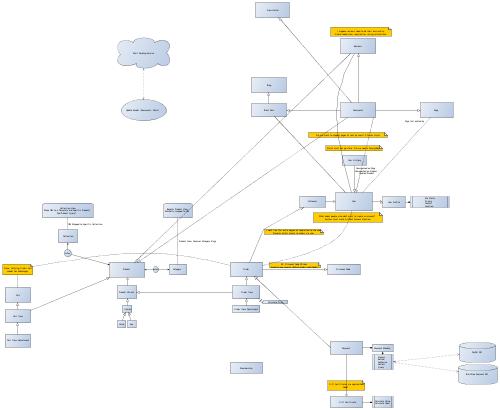
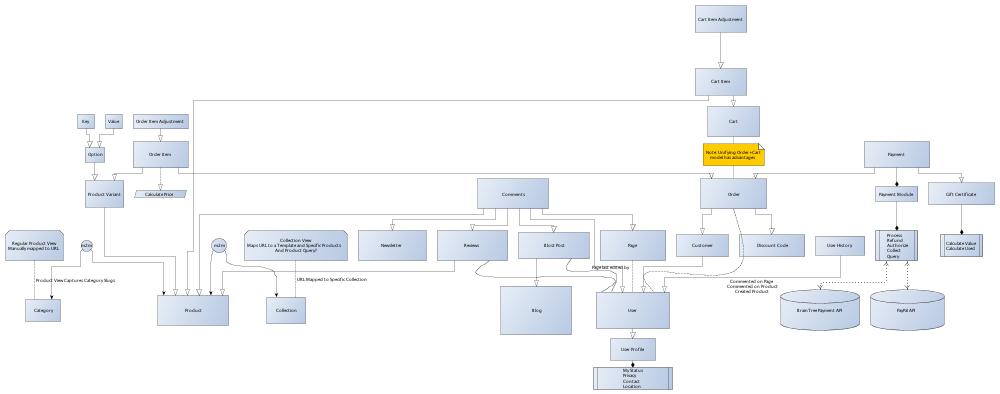
Here’s the current state of the new Grove software that will also share a common ground with upcoming Anuva software.

http://stackoverflow.com/questions/4927511/free-or-inexpensive-simple-table-class-visualization-software-for-osx-er-dia

This gets better and better!

Python — StackOverflow Post Checker / Updater

I’m a little obsessed with constantly refreshing stackoverflow.

I can’t find an API for it (I’ve since found the Stack Exchange API, oops), so I wrote a little python script to parse it for new questions as an exercise.

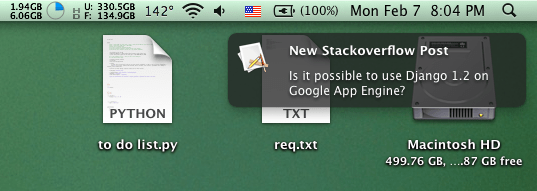
I built a fetcher class that builds an SQLite database (if one doesn’t exist), parses stackoverflow for questions relating to django, and determines if any are new (based on the URL being stored in the database) and does a Growl notification if found.

It’s extremely straight forward, but this shows you the power of python. From idea to implementation in no time at all, including figuring out how Growl’s python bindings work.

Simply amazing!

"""
"""
Stack Overflow Post Checker
===========================

Parse stackoverflow HTML for questions, store in sqlite database
and send notifications of new questions.

By Yuji Tomita
2/7/2011
"""
import os
import sqlite3
import urllib2
import BeautifulSoup
import Growl


class StackOverflowFetcher:
    def __init__(self):
        self.base_url = 'http://stackoverflow.com/questions/tagged/'
        self.get_or_create_database()
        
        self.growl = Growl.GrowlNotifier(applicationName='StackOverflowChecker', notifications=['new'])
        self.growl.register()
        
        self.tags = [('django', True), ('python', False)]
        self.get_questions()
        self.close_connection()
        
    def get_questions(self):
        """
        Parse target URL for new questions.
        """
        while self.tags:
            tag, sticky = self.tags.pop()
            url = self.base_url + tag
            html = urllib2.urlopen(url).read()
            soup = BeautifulSoup.BeautifulSoup(html)
        
            questions = soup.findAll('h3')
        
            for question in questions:
                element = question.find('a')
                link = element.get('href')
                question = element.text
            
                if self.is_new_link(link):
                    self.growl.notify(noteType='new', title='[%s] StackOverflow Post' % tag, description=question, sticky=sticky)
                    self.record_question(link, question)
                    
                    
    def get_or_create_database(self):
        """
        Check if database file exists. Create if not.
        Open file and send query. 
        If query fails, create tables. 
        """
        path = os.path.join(os.path.dirname(__file__), 'questions.db')
        
        try:
            f = open(path)
        except IOError:
            f = open(path, 'w')
        f.close()
        
        self.conn = sqlite3.connect(path)
        
        try:
            self.conn.execute('SELECT * from questions')
        except sqlite3.OperationalError:
            self.create_database()
            
            
    def create_database(self):
        self.conn.execute('CREATE TABLE questions(link VARCHAR(400), text VARCHAR(300));')
        
        
    def is_new_link(self, link):
        results = self.conn.execute('SELECT * FROM questions WHERE questions.link = "%s";' % link).fetchall()
        if not results:
            return True
        return False
    
    
    def record_question(self, link, question):
        results = self.conn.execute('INSERT INTO questions(link, text) VALUES ("%s", "%s");' % (link, question))
    
    
    def close_connection(self):
        self.conn.commit()
        self.conn.close()


stack = StackOverflowFetcher()

This code is now on GitHub where it will be more updated.
https://github.com/yuchant/StackOverflowNewPostCrawler
iPhone/Objc — Programmatically Create Scrollview Without Interface Builder

I’m new to Objective C in general, and am having trouble finding useful docs with step by step examples like the django project (best docs in the world!).

I could find endless resources on building UIScrollViews through the Interface Builder, but not programmatically.

My biggest hurdle was: How do I subclass a UISCrollView method call (like viewForZoomingInScrollView) if I’m not using a UIScrollView class?

You simply need to set the delegate for the scrollView to point to whichever class HAS those methods.

Example:

// in my .m file
-(void)loadView {
    CGRect fullScreenRect = [[UIScreen mainScreen] applicationFrame];
    scrollView = [[UIScrollView alloc] initWithFrame:fullScreenRect];
    scrollView.delegate = self;
    self.view = scrollView;
}
// now my scrollView is loaded and ready to be populated with a scrollable subframe in viewDidLoad

// because the delegate has been set to 'self', these methods will be called despite this class not being a UIScrollView subclass.
-(UIView*)viewForZoomingInScrollView:(UIScrollView*) scroll  {
    return imageView;
}


Django — Override ModelAdmin ChangeList Ordering By Annotate and Aggregate

I ran into trouble overriding django’s ModelAdmin ChangeList Ordering.

Overriding the ModelAdmin.queryset did not help because while the Queryset can be defined, the ordering is overridden by `ChangeList.get_ordering`

My solution is to override the ModelAdmin get_changelist method and return a subclassed ChangeList.

class AccountAdmin(admin.ModelAdmin):   
    # ...
    
    def get_changelist(self, request, **kwargs):
        """
        Returns the ChangeList class for use on the changelist page.
        
        Force get_ordering to return None (if no ordering specified)
        to prevent  from applying ordering.
        """
        from django.contrib.admin.views.main import ChangeList
        
        class SortedChangeList(ChangeList):
            def get_query_set(self, *args, **kwargs):
                qs = super(SortedChangeList, self).get_query_set(*args, **kwargs)
                return qs.annotate(amt=Sum('entry__amount')).order_by('-amt')
                
        if request.GET.get('o'):
            return ChangeList
            
        return SortedChangeList

We take advantage of the fact that get_changelist can be overridden, and the fact that get_query_set is called AFTER ordering is done on the ChangeList.

Let me know if you have other solutions!

Python — Globally Override Function Imports

To globally override imports (per python session), modify sys.modules to whatever you’d like.

import sys

sys.modules['csv'] = 'I just replaced the csv module'

import csv
print csv  # output 'I just replaced the csv module'

That’s pretty straight forward, but if you need to replace a function within a module, you’d have to pull out the module, set the new function, and set the module in sys.modules.


import sys

module = sys.modules['module']
module.myfunction = lambda: 'my new function'

sys.modules['module'] = module

from module import myfunction
myfunction() # output 'my new function'

Python — Script to Rename Files and Crop Images in Directory

I’m often using python to rename files for me or process them in batches when I need to save some time / immense boredom, and I do it so infrequently I generally have to look at reference material.

Here some code for future reference.

"""
Python Rename Script
=========

This is just some one off code I wrote to save myself from doing repetative tasks. 

It probably took as long as manually renaming them and cropping the files.

The source files were in this format:
- name fun.jpg
- name work.jpg

I needed them in the following format:
- team_name.jpg
- team_name2.jpg 

and at specific dimensions.

I at first just wanted to rename, but found out some images were odd sizes.
"""

import re
import os
import shutil
from PIL import Image, ImageOps

dirname = os.path.abspath('.')
file_paths = os.listdir(dirname)

for _file in file_paths:
    try:
        matches = re.findall('(.*) (fun|work)\.jpg', _file)[0] # find name & if fun or work.
        name = matches[0]
        _type = matches[1]
        prefix = 'team_'
        suffix = ''
        if _type == 'fun':
            suffix = '2'
        
        new_name = prefix + name  + suffix + '.jpg'
        
        image = Image.open(_file)
        
        imagefit = ImageOps.fit(image, (150, 170), Image.ANTIALIAS, 0, (0.5, 0))
        imagefit.save('tmp/'+ new_name, 'JPEG', quality=90)
        
    except Exception, e:
        print e, _file
        
        # I don't really care about when this fails..
        # it would fail on any regex match failure like .DS_STORE (OSX file)
        # or my tmp directory

Mac OSX – Python Imaging Library PIL on Mac 10.6

Installing PIL was no problem, but I couldn’t import it.

I used homebrew, PIP, easy_install, they all say it’s correctly installed in the various directories.

I just decided to fix it by going to /Library/Python/2.6/site-packages and making a symlink from the egg file to to PIL

cd /Library/Python/2.6/site-packages
ln -s PIL-1.1.7-py2.6-macosx-10.6-universal.egg/ PIL

I suggest you not dwell on it and do this instead.