Django — django-mailer multi account setup plus throttling

I forked django mailer to support multiple accounts and email queue throttling per day per account.

https://github.com/yuchant/django-mailer

django-mailer by James Tauber http://jtauber.com/
http://code.google.com/p/django-mailer/

A reusable Django app for queuing the sending of email

Forked to support multiple accounts and email throttling.

Forked to allow django-mailer to use multiple email accounts and to impose a daily sending limit per email account.

Specifically made for Google Apps users who have a 500 email a day per user sending limit and are also limited to a from_address that is the actual authenticated account.

If you’d like to use different “from” emails, it’s currently not an option with google apps.

Options

DAILY_SENDING_LIMIT

Specify an optional MAILER_DAILY_SENDING_LIMIT in settings.py to limit the amount of emails per 24 hours.

Throttling is done via emails sent in the last 24 hours, not discrete days.

# settings.py MAILER_DAILY_SENDING_LIMIT = 400 

MULTIPLE ACCOUNTS

send_mail takes an extra keyword argument, account, which is an integer mapped to a specific account in settings.py.

Account 0 is mapped to the default email settings EMAIL_HOST, EMAIL_PORT, etc.

Account 1 is mapped to EMAIL1_HOST, EMAIL1_PORT, etc.

All settings below are required and mailer will complain if it fails to find a setting.

# settings.py
EMAIL_HOST = 'smtp.gmail.com'
EMAIL_PORT = 587
EMAIL_HOST_USER = 'foo@example.com'
EMAIL_HOST_PASSWORD = 'password'
EMAIL_USE_TLS = True

EMAIL1_HOST = 'smtp.gmail.com'
EMAIL1_PORT = 587
EMAIL1_HOST_USER = 'bar@example.com'
EMAIL1_HOST_PASSWORD = 'password'
EMAIL1_USE_TLS = True

Usage

from mailer import send_mail

send_mail("Subject", "Body", "from@example.com", ["to@example.com"]) # uses default email settings
send_mail("Subject", "Body", "from@example.com", ["to@example.com"], account=1) # uses EMAIL1_* settings
send_mail("Subject", "Body", "from@example.com", ["to@example.com"], account=2) # uses EMAIL2_* settings

bash $ python manage.py send_mail
# iterates through Messages by account and sends up to DAILY_SENDING_LIMIT per account if specified.

PIP — Install Specific Commit from Git Repository

I’ve switched to an all PIP deployment setup. I used to keep some libraries in my code repository because I needed specific versions or hacked ones.

I’m now in a setup where I don’t have any hacked libraries, so all is good, except I need a dev version of django-mailer that’s not on PIP.

PIP can handle git repos, but what if an unstable change gets introduced?

Well, until now, I didn’t know you could specify a commit hash in your pip install command.

Specify the hash tag with @, and use git:// syntax, not the default https: that the clone bar shows you.

# requirements.txt
git+git://github.com/jtauber/django-mailer.git@840d25bb9db9fbc801b9

# shell
bash $ pip install -r requirements.txt

Django / Python – Fabric Deployment Script and Example

Fabric.

I’d heard about it for at least a year+ but I never got around to it.

I was a little intimidated by it.

The examples seemed so simple, but that was the problem – they seemed too simple, like the examples you run into which look completely uninformative, just a quick blot of code and no explanation.

Well, it turns out fabric really is just that magical.

This is straight life changing!

This is as useful as when I first discovered how much easier it was (for me) to use Git for branching / merging than SVN, or deciding to switch to a linux-like environment for web development.

I’m writing about this today because I was always intimidated by it / thought it would take some time to learn, when there was no reason to be. It’s extremely simple.

Hopefully, it helps somebody out there with the same reservations.

First, let me point you to the official fabric docs where you can find the tutorial and more.

Install fabric.

First, pip install fabric on each machine you need to use fabric on.

 pip install fabric 

Create the fab file that contains functions

Create a blank file called fabfile.py in the directory you’d like to use the fabric commands from.

For my django project, that’s the directory that contains settings.py and manage.py. My “home base”, or where you’ll find me in an average terminal window.

Create your first fabric command

In just a few lines of code, let’s set up a fabric script that asks the server to pull from the git repository and restart apache.

 
    # import fabrics API functions - self-explanatory once you see 
    from fabric.api import * 
    def pushpull():
        local('git push') # runs the command on the local environment
        run('cd /path/to/project/; git pull') # runs the command on the remote environment 
    

Let’s try running that in bash.

 bash$ fab pushpull 

It will ask you for a server to connect to that’s running fabric. You will want to enter in your username@host:port here.

Obviously, typing the full URL every time defeats the purpose of an automation script – let’s add it into our fabric file.

Add remote server commands

Let’s add the remote server information to our fabric file. We need to add our server information to our fabric script via the env.hosts parameter.

 from fabric.api import * 
 env.hosts = ['me@example.com:22']
 def pushpull(): 
    local('git push') # runs the command on the local environment 
    run('git pull') # runs the command on the remote environment 

env is a dictionary containing various settings, one of which is ‘hosts’ – a list of hosts that all commands will run through.

Now, if we run fab pushpull, we won’t need to type in the server name. If you have SSH keys set up, you won’t need a password.

Add more server setup commands

Next, I want support for working on a development server or production.
Adding this information via a separate function ensures our commands are not tied to specific environments. For example, I use the same functions chained with “dev” or “prod” to determine which environment I am applying the command towards.

Okay, our first roadblock; it turns out that you can not dynamically set env.hosts within a function – it will not register.

 def pushpull(host=None):
    env.hosts = [host] # this will fail
 bash$ fab pushpull:me@example.com # fails 
 

You need to define it in a separate function. Here’s what I’ve done.

I’ve set up a “dev” and “prod” function that sets up the environment prior to running another fab command. For good measure, I also created an “all” command.

 dev_sever = 'me@dev.example.com:22'
 prod_server = 'me@example.com:22'
 
 def dev(): 
    """ Use development server settings """
    env.hosts = [dev_server] # this is the place to add other setup, such as if the django project is in a different directory 
    # reference this variable later 
    env['dir'] = '/path/' 
    
    
 def prod():
    """ Use production server settings """ 
    env.hosts = [prod_server] 
    
    
 def all(): 
    """ Use all serves """
    env.hosts = [dev_server, prod_server]

Now, we can run the command.

 bash$ fab dev pushpull bash$ fab prod pushpull bash$ fab all pushpull 

Wow, amazing. The possibilities already are limitless!

Some tips – reuse functions.

I’ve found that writing many small functions helps since I’m not always using fabric.

For example, I have a large, full deployment function that…

  • commits local changes
  • pushes the changes
  • pulls the changes on the remote machine
  • syncdbs the remote machine
  • migrates the remote machine
  • restarts apache and other servers

Now, each one of these functions is actually another separate function, since who knows, I might have committed my changes myself and even pushed changes and now I only need a server restart – for me that’s “fab prod deploy”

Passing arguments to fabric functions.

Functions can accept arguments, and are passed to the python functions from the shell via a colon

 bash$ fab dev some_func:arg1,arg2,keyword=kwarg 

Preventing errors from blowing up

Any non success exit code will stop your function. Use the settings function from the api to allow them to silently pass.

For example, git commit -a will fail if there’s nothing to add.

 
    def foo():
        with settings(warn_only=True):
            local('git commit -a') # fabric will no longer abort 

Keep functions open-ended via *args

There are tons of special case scenarios with django-south and its commands, so I’ve made a migrate fabric command that accepts an arbitrary number of arguments, to support say migrate myapp 0001 —fake

 
    def migrate(*args):
        with cd(env['mypath']): # every command will now be run in the path specified 
            run('python manage.py migrate ' + ' '.join(args)) 
 bash$ fab dev migrate:--all,--fake,0001 

Define a way to revert a mistake

Make sure you have a way out of an operation that kills your site.

In my case, I have set up a git revert command as “revert”

    def revert():
        """ Revert git via reset --hard @{1} """
        with cd(env['dir']):
            run('git reset --hard @{1}')
            arestart() # restarts server 
            

This command would undo the last pull to the working state the server should have been in before we forced a pull.

Use docstrings

The first line of your docstring appears when you list your fab functions via fab –list

One final note:

Check the docs. There are functions such as sudo(‘myfunc’) that will run as root. Very useful.
HTML — Non Destructive HTML Tabifier

For whatever reason, if you need a non destructive HTML tabifier, I’ve found a great one. It will NOT modify your code.

http://tools.arantius.com/tabifier

I’m working in a shopping cart environment that can only handle one template file for the product pages and it must be < 64kb, meaning I've started to remove all whitespace to fit in my templates.

You really can't argue that the size should be below 64kb, if you have one template to handle infinite product types.

Python — If Else Condition in Lambda Expression

I was writing a lambda function to decode unicode into UTF8 but needed a conditional as some items would be None.

The syntax for inline if else is..

'result' if 'condition' else 'else result'
map(lambda x: x.encode('UTF8') if isinstance(x, unicode) else x.__str__(), mylist)

Django — Ordering Admin / ModelAdmin Inlines

Ordering admin inlines is a common problem with a not so documented fix that I created. Even the BaseInlineFormSet.get_queryset() isn’t documented. By the way, it’s ever so slightly confusing that managers use `get_query_set` and this uses `get_queryset`.

To order admin inlines, specify the FormSet used by the Inline and override get_queryset() in your formset definition with ordering.

from django.forms.models import BaseInlineFormSet

class OrderedFormSet(BaseInlineFormSet):
    def get_queryset(self):
        return super(OrderedFormset, self).get_queryset().order_by('-sortfield')

class MyInline(admin.TabularInline):
    model = Item
    formset = OrderedFormSet

Django Docs Down

The django docs are down!

It occurs to me I’ve been preaching about how amazing the docs are. If I lost access to them, they wouldn’t be so useful.

I’ll go look into downloading them. Apparently they are in the release folder. I’ve never looked 🙂

WordPress — Disable Proofreading

I put this one off for months because I could never find the settings and google searched didn’t return very helpful results.

Proofreading settings live in Users > Personal Settings

SolidWorks — Where is the Show Feature Dimensions Button?

I’m trying to use a spreadsheet driven part because I will be trying MANY different sizes and combinations of these parts experimentally to find a design I like.

Configurations were not the answer, as I’d still need go into the part and manually change the extrudes, save as a new configuration, etc.

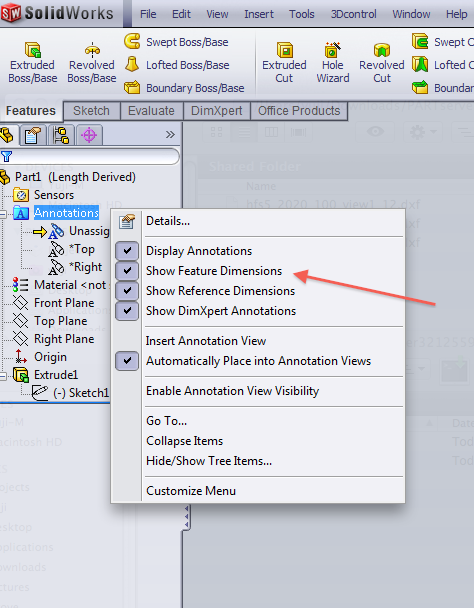
Anyways, to use design tables, you need to see your feature dimensions, and the solidworks help files just say “Annotations > Show Feature Dimensions”. It’s definitely not in the options tool, no, it’s in the right click menu of “Annotations” in your Feature Manager.

Laser – Structural Beam Bending Calculations

This is the first post in the Laser category. I wrote “Structural Beam Bending” because I am not referring to a laser beam, but an aluminum beam in my laser.

It took me a while to get back on the engineering concepts train. The last time I did any unit conversions at all was at least 5 years ago.

The first major hiccup I experienced while attempting to do beam bending calculations with a program called BeamBoy was that I wanted to determine my beam lengths in inches. All of my material data is in metric, so converting mm4 to in4 took me a moment to realize you simply divide by (mm/inch)^4, which is 25.4^4, or 416,231.4256

Unlike programming, physics information is not as readily available in easily digestible formats. I will outline my experiences to help anybody else who stumbles across this blog.

To calculate beam deflection:

Find your material’s Moment of Inertia, Modulus of Elasticity, and the Distance to Farthest Fiber.

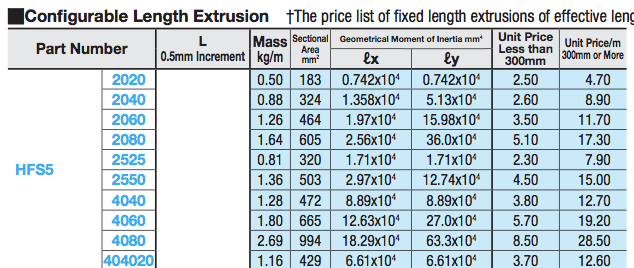
My parts come from Misumi, so their data sheet looks like this:

The Moment of Inertia for the two axes are clearly shown. The Modulus of Elasticity is a property of the material, and I couldn’t actually find the exact grade of aluminum Misumi is using, so I looked online for average values and it ranged from 9,000,000 PSI to 11,000,000 PSI.

Distance to farthest fiber is the farthest distance from the beam’s neutral axis, so I interpret that to be 1/2 the width. This may be wrong.

First, start up BeamBoy and type in the length of your beam.

Enter in the properties of your beam as discussed above: moment of inertia, modulus of elasticity, and distance to farthest fiber.

Next, add two supports to your structure, I simply added a support at the start and end of my beam.

Add a distributed load over the length of your beam equal to the weight per distance (in my case, lb/ft) to simulate the weight of the beam itself.

Optionally, add a distributed or point load to the beam. I wanted maximum deflection for a given weight so I used a point load in the “worst” possible spot: the center, away from my 2 support structures.

Click calculate and see your results!

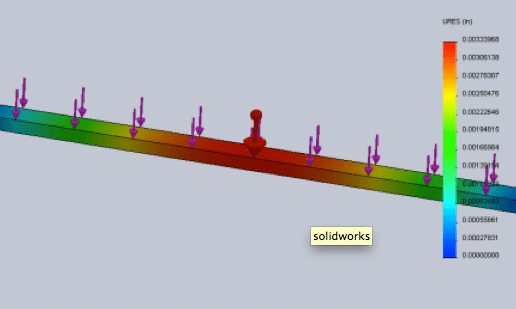
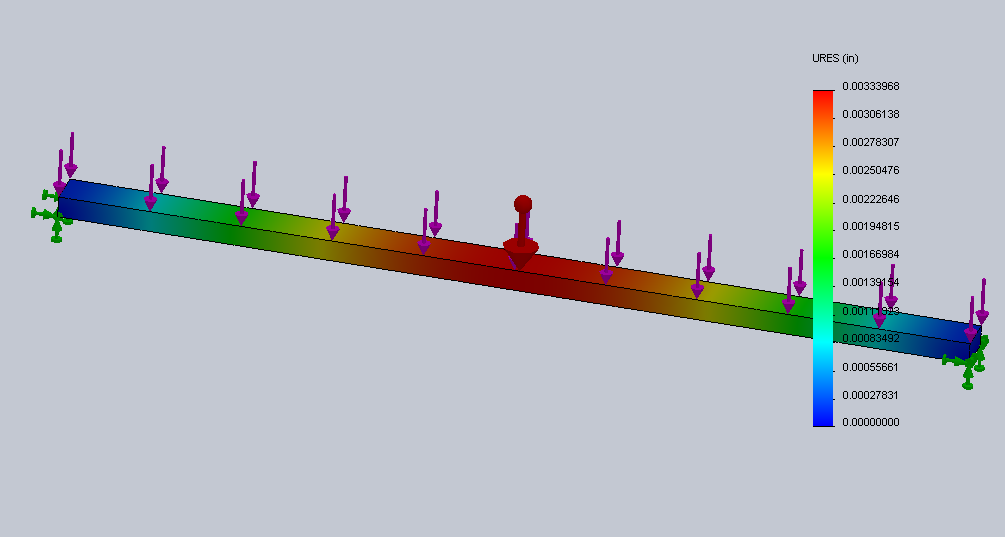
PS: I tried doing this in Solidworks beam modeler but the results don’t seem to be accurate.. Perhaps it’s because I was using a distributed load?

The Solidworks beam simulation is potentially a huge time saver as you the length, material properties and thickness is auto calculated.

Just can’t trust it yet.