I had to google for an hour to figure this one out. Damn you apple!
Yes, I’ve right clicked and click transfer purchases. Yes, I’ve synced. No, I do not want all my apps/songs deleted from my iPhone.
I found in an obscure forum reference that the computer needs to be Authorized by itunes. It looks like you have 6 computers per account.
How to do it right:
Open iTunes, click on the Store menu, and click Authorize this computer. Done.
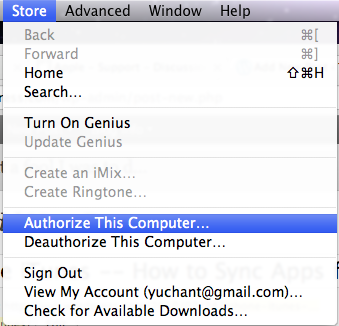
Now, right click your iphone and click Transfer Purchases, or go to the file menu for the same thing.
Oh my effing god, that was 150x harder than needed. Documentation would help. It was confusing when right clicking transfer purchases before authorization shows a split second of one of my apps in the status bar that disappears with no warning. It would be a good place to throw out an error message saying: “Hi, no apps have been synced for 1 of 2 reasons: you have no apps. your computer is not authorized.”
I really hope this helps somebody else out there.
 Yuji Tomita
You are my hero, Yuji! Thank you, thank you, thank you! #internethero