How to setup your mac terminal page up and page down shortcuts.
Default for page up/ page down in terminal is to scroll the actual terminal, not send a page up / page down command TO the program in the terminal .
In short, open terminal settings > go to key bindings>
set page up to 33[5~
set page down to 33[6~
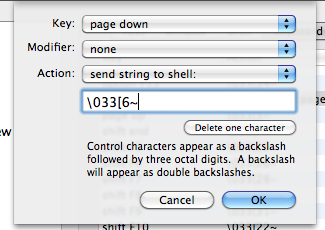
Note that 33 is the ESC key. Typing in \ on its own will result in an escape slash (or smth): \\
So in this case, type in ESC, [, 6, and ~.
Let me know if it helped!
 Yuji Tomita